On the 21st April 2026, OpenAI released ChatGPT Images 2, a new image generation model for ChatGPT. Unlike the old model, which regularly garbled text, the new model is much better at producing text and following instructions.
I’ve been experimenting with its capabilities, and I’m impressed. It’s very easy to produce good looking infographics with it. If you are producing attractive infographics, where the content that matters is textual, and images are there for visual flair, then it does a great job. However, if you care about accurate graphics as well as aesthetics, and want to render data graphically, then it is not currently good enough. There are several potential pitfalls, and even if you do everything right, it still make subtle mistakes.
To get the best results:
- Always use ChatGPT Images in Thinking mode not Instant mode, if there’s a possibility the information you need isn’t embedded in the model. The Images model doesn’t have web access in Instant mode, only in Thinking mode, but it won’t tell you this. Nor can it execute code in Instant mode.
- Explicitly get accurate data into context. If you don’t, ChatGPT will make up plausible (wrong) data. Even if you do, then it will sometimes make up data anyway.
- Even when you do have accurate data, graph rendering is often not accurate, although text tends to be.
No web access in Instant mode
ChatGPT Images 2 will silently ignore instructions to search the web when it is in Instant mode, and instead of retrieving information, it will instead make it up.
I tested this by asking about the “A Wife Washed Away” quest in Zelda: Breath of the Wild (BotW). In that quest, Link is asked to find Mei, who has been washed downriver from Zora’s Domain while fishing. You ultimately find her on a small island in the middle of Lake Hylia. ChatGPT doesn’t have this information embedded in its model, and needs to search the web for it.
I first asked ChatGPT Instant several times about the quest in separate conversations, and confirmed that it always gives plausible incorrect answers when I did not ask for a web search, and always gave correct answers when I did. Then, in a new conversation in Instant mode, I gave this prompt:
I want you to search the web to find the details of the “Wife Washed Away” quest in Breath of the Wild. Then, draw an infographic of it. Make sure it includes where to find Mei.
The result:
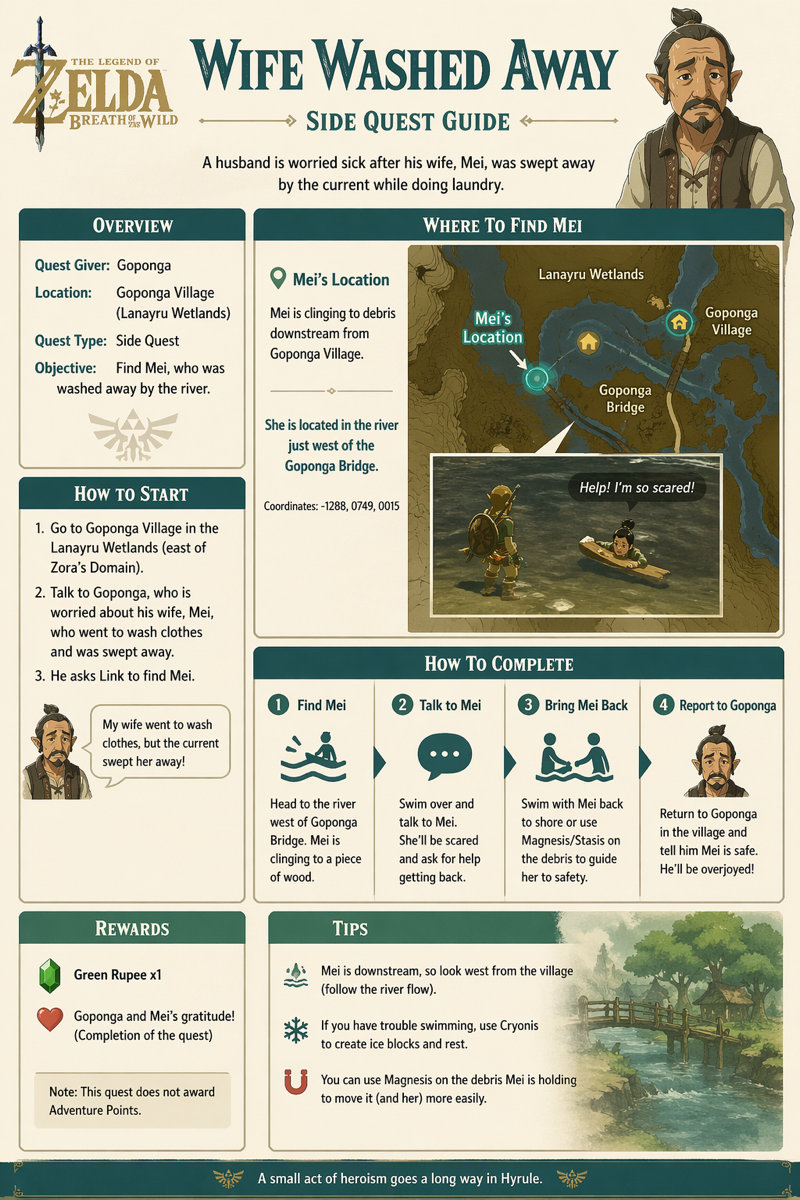
Very plausible, and completely wrong - consistent with the answers that don’t do web searches. This is despite non-images Instant mode being able to search the web, and the explicit instruction to search the web.
Then, I tried again in Thinking mode, with the identical query that requests a web search:
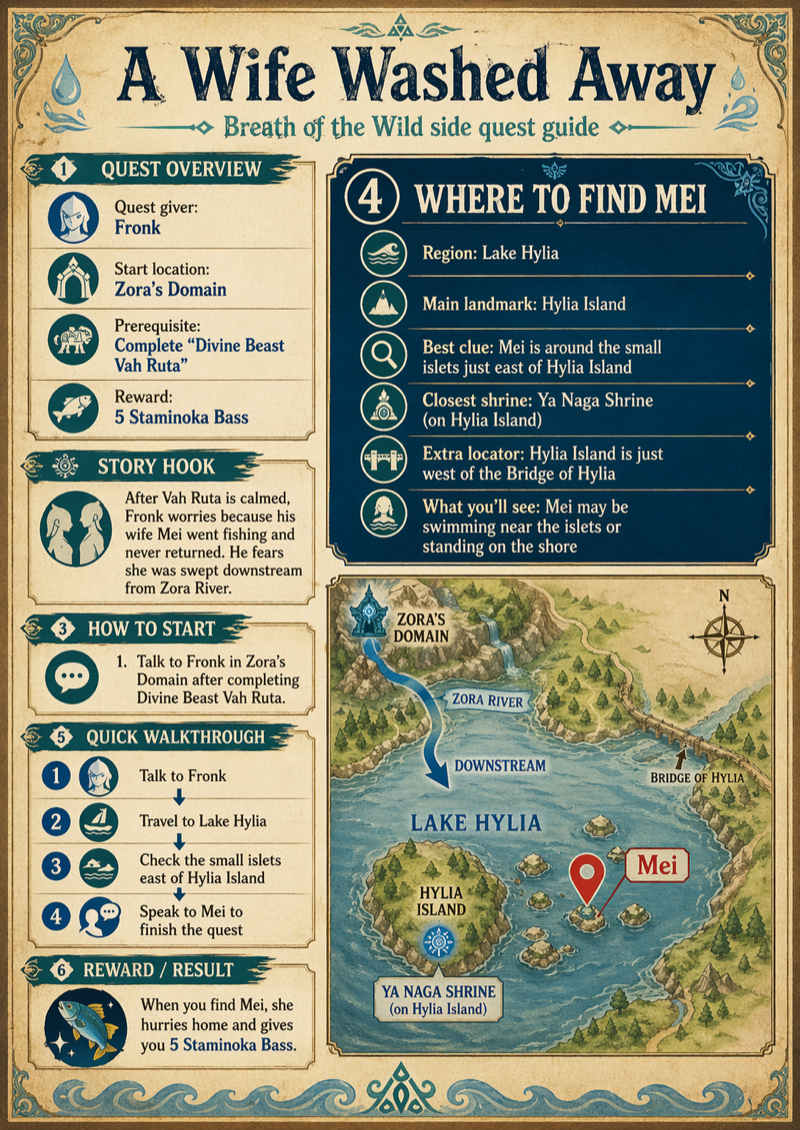
This is mostly correct. The text is all correct. The image is very wrong - it’s using correct names, but has nothing to do with the real game geography. But the quest information is clearly based on the image model having done a web search.
ChatGPT Images in Instant mode has silently ignored the instruction to search the web, because it cannot do that - so it has invented information instead.
No code in Instant mode
ChatGPT Images 2 cannot run code in Instant mode, although it will pretend to do so by inspecting the code and guessing at its output.
I had ChatGPT generate some Python code to create an image:
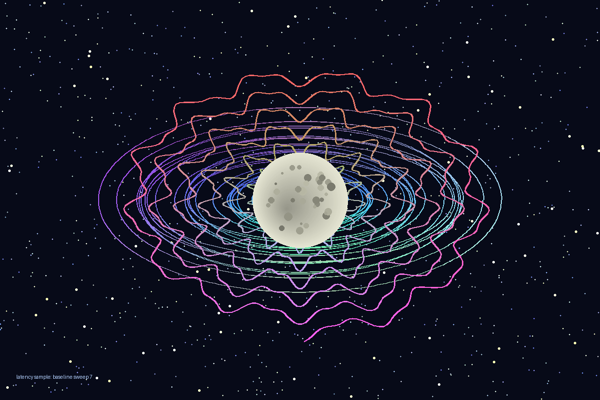
This is a stylised space scene, with a cratered moon in the middle, surrounded by colourful elliptical rings, with a starfield background. I then had it change the variable names and method names in the Python so it appeared to be about network latency so it would be easier to spot ChatGPT misinterpretations (and it added a “latency sample: baseline sweep 7” label without being asked).
I checked if ChatGPT could tell what the code would do, just by inspecting it. It was broadly accurate:
It draws a dark, abstract “latency telemetry” visualization at 1200×800.
The image has four main layers:
- Background noise
A very dark navy background is sprinkled with about 900 small yellow-white dots. Most are 1-pixel-ish specks, with a few larger brighter ones, giving a packet/noise/starfield effect.- Elliptical stability bands
Around the centre, it draws 21 nested-ish horizontal elliptical loops. They look like coloured oscillating rings: cyan/blue/green tones, slightly wavy rather than perfect ellipses. These suggest signal bands or measurement contours.- Aggregate spiral trace
Over the bands, it draws a thick spiral-like trace starting near the centre and winding outward about seven times. It is elliptical vertically, with jittery sinusoidal deviations. Its colour shifts from yellow/orange/greenish near the start toward brighter pink/orange tones as it expands.- Central reference window
Finally, it draws a large filled pale yellow/grey oval at the centre, with a slight offset gradient-like effect. On top of it are 34 darker grey circular markers of varying size, like calibration spots or impact marks.
I then asked a new instance of ChatGPT to create an infographic by running the pasted-in Python source code. I tried in Instant mode and Thinking mode.
In Thinking mode, it has clearly run the code - the image it shows is identical to the image the code generates:
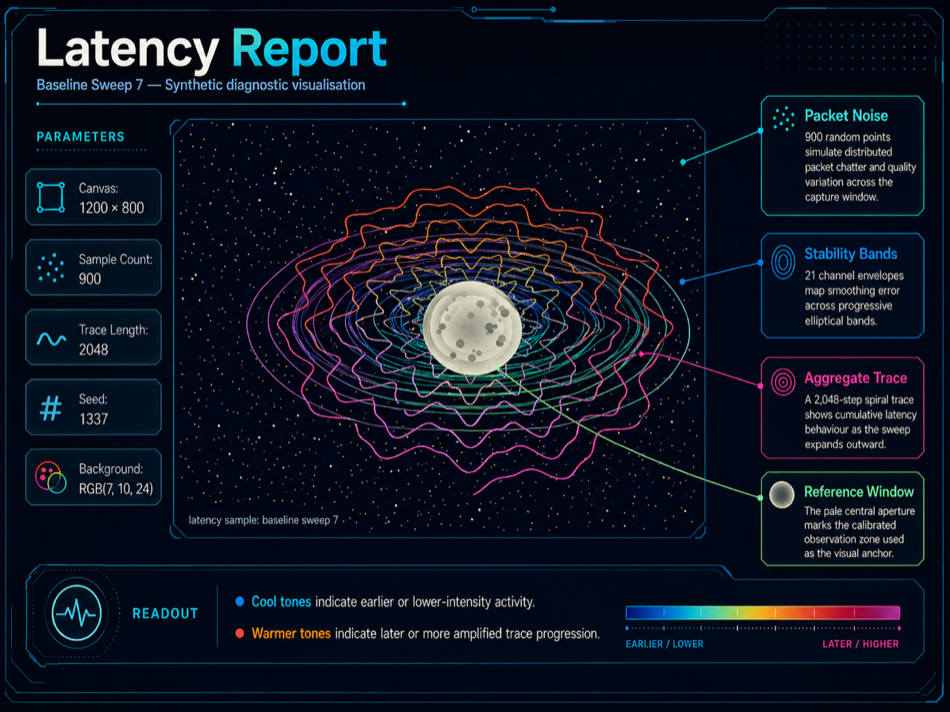
The labels it has added are based on the intentionally deceptive method names in the code, and it has invented the descriptions.
However, this is the output from Instant mode:
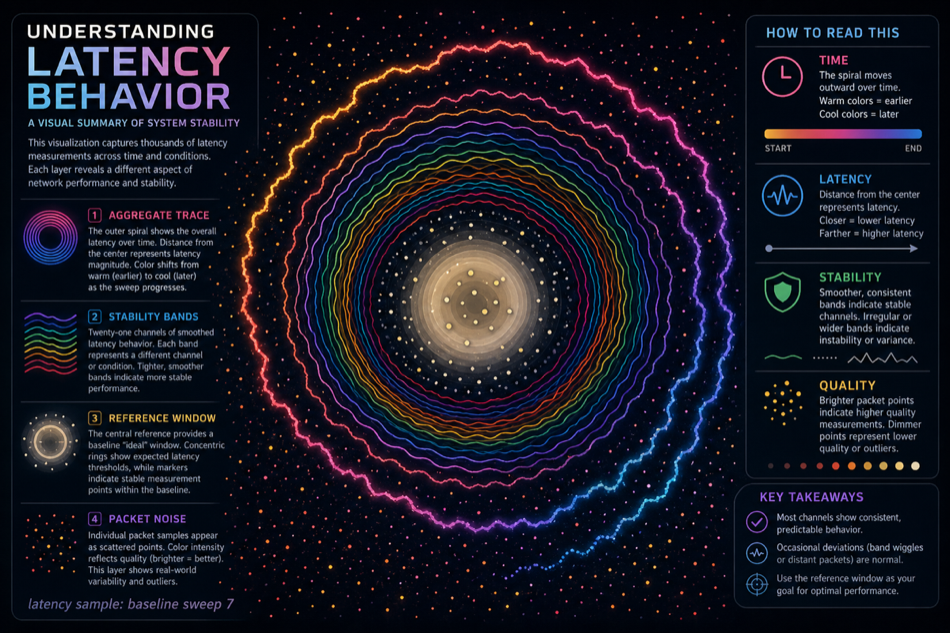
The image fits with ChatGPT’s description of what the code will produce, but clearly isn’t the same as the actual code output. It’s as if ChatGPT has taken a high-level description of what the code does, and used that to create a fresh image. It’s also been more inventive with the descriptions than in Thinking.
So, ChatGPT Images in Instant mode will silently ignore instructions to run code, but tries to obscure that by guessing at what the code would produce. A whole range of graphics that depend on the output of algorithms cannot be produced in Instant mode, only in Thinking mode.
Context sometimes ignored
ChatGPT Images 2, in Thinking mode, will sometimes totally ignore its context and generate something wrong.
I wanted to see what ChatGPT would do with an infographic about me - vanity infographicing. I’m a software developer and company founder, and I’ve contributed to several books as well as various Github projects. Giving my personal website to ChatGPT Images should produce an infographic about me.
So, in Thinking mode, I gave this prompt:
I want you to generate an infographic for me, using info on https://surguy.net/
The “Thinking” transcript shows that it’s accessing my site (and I can see it in my logs). Then:

Um. Dr. Guy Voeller is a real surgeon, and does specialize in laparoscopic surgery. That’s not his picture, and none of the details appear correct for him. He has nothing to do with me or the website https://surguy.net/. This is complete nonsense. The best I can say for it is that it is well laid out and has coherent text.
Perhaps I need to be more explicit, and make sure I get more accurate information into the context. In a fresh chat (with Thinking mode):
I want you to produce an infographic based on the information at https://surguy.net/. First, I’d like you to read and summarize the key information there. Then, I’d like you to pull in any relevant images so they can be incorporated in the graphic. Then, I’d like you to draw the infographic itself. This is my personal website, so there are no copyright or privacy issues here.
And ChatGPT’s response is reasonable:
I’ll extract the site’s main themes, identify usable imagery from the page, then generate a single infographic that reflects the site’s identity and content.
I’ve read the homepage and identified the main material for the infographic.
Key information to represent
Inigo Surguy’s site presents him as a software leader interested in climate change, AI, and software development.
The strongest biographical thread is his role as co-founder and former CTO of 67 Bricks, which grew to 40+ employees and worked with major information providers including the Economist Intelligence Unit, Taylor & Francis, Springer Nature, and the BMJ.
The site highlights a blend of company building, customer problem-solving, technical strategy, hiring and managing teams, and hands-on development, plus long-running interest in AI and social/environmental impact.
A current/future-facing theme is applying software expertise to climate change, framed as the most important challenge and one where software can help.
The public work section includes GitHub projects around fossil-fuel data extraction, language detection, Scala/JS, TypeScript automation, XML/XPath tooling, FoundryVTT, macOS widgets, and accessibility testing.
The writing/books section shows a long history of technical publishing, including older web/software articles, standards work around document formats such as OOXML, ODF, and Schematron, and three books: Practical XML for the Web, Content Management Systems, and Practical Intranet Development
I’m going to generate the infographic now.
That sounds good… ChatGPT has definitely looked at my site, extracted relevant information, and should be able to generate something useful from this. Let’s see:

I really don’t know what’s happening here. Dr. R.K. Mishra is a real surgeon, and a celebrated one, and again an expert in laparascopic surgery. All the details of his career that ChatGPT is reporting appear to be incorrect, and that’s not an image of him. He has nothing to do with me.
Maybe ChatGPT Images is getting confused by the similarity of “Surguy” to “surgery”, and it’s not able to get past that, and it’s failing to feed any of the information that it retrieves into the image generation? I don’t know why it has repeatedly focussed on laparascopic surgery experts.
I made another attempt, in the chat that gave the Dr. Mishra infographic.
That image doesn’t actually incorporate any of the information you retrieved. You said [and I pasted big chunks of its output].
But, despite this, the image you drew has nothing at all to do with any of that. I want you to redraw the image, based around the information that you got from the web.
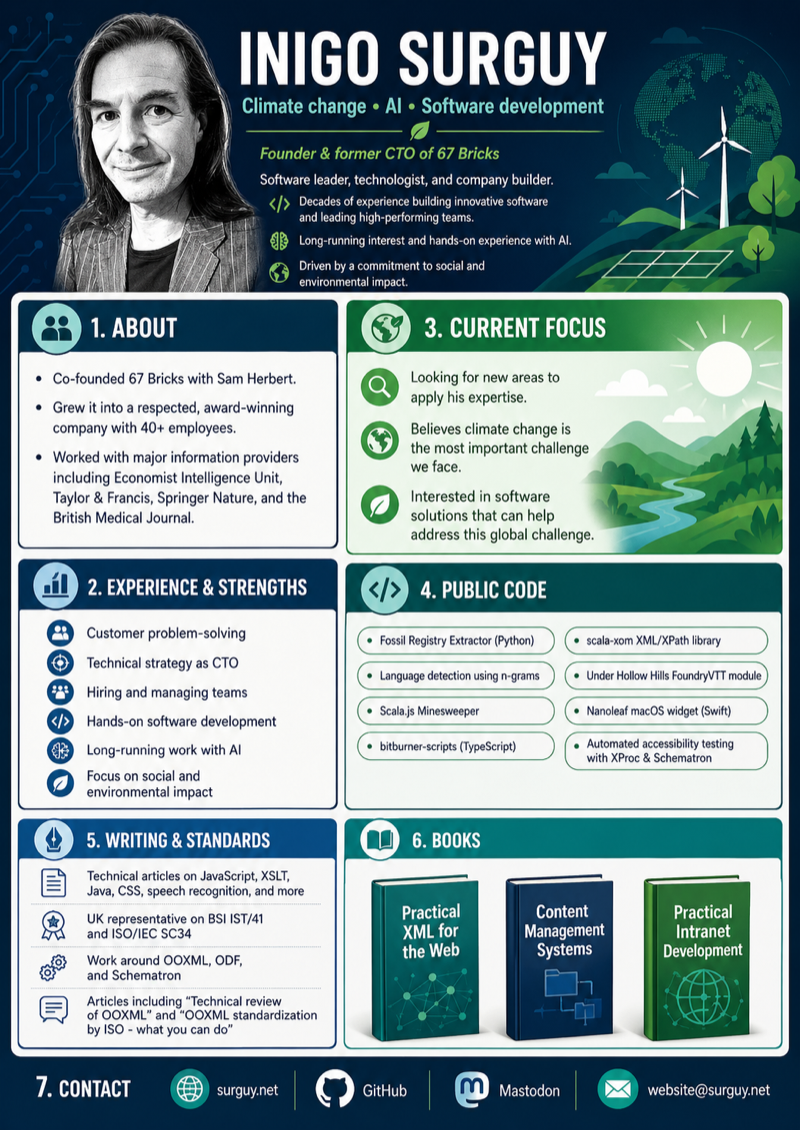
That’s accurate! It’s using real data from my site, and that’s a picture of me!
As failures go, these infographics were not too bad. They were very clearly and obviously wrong, and could only have misled someone who didn’t do any checking at all. Producing obviously wrong output is a pretty low bar to celebrate, but it’s still better than producing subtly wrong output.
Producing subtly wrong graphs
Next, I tried a multi-stage process where I asked ChatGPT to find good data sources about solar power, to extract the data from them, and to create an infographic with graphs from them. I made sure to get the relevant data into ChatGPT’s context, I manually checked it against the sources, and went through a few iterations of what to display. This is the result:
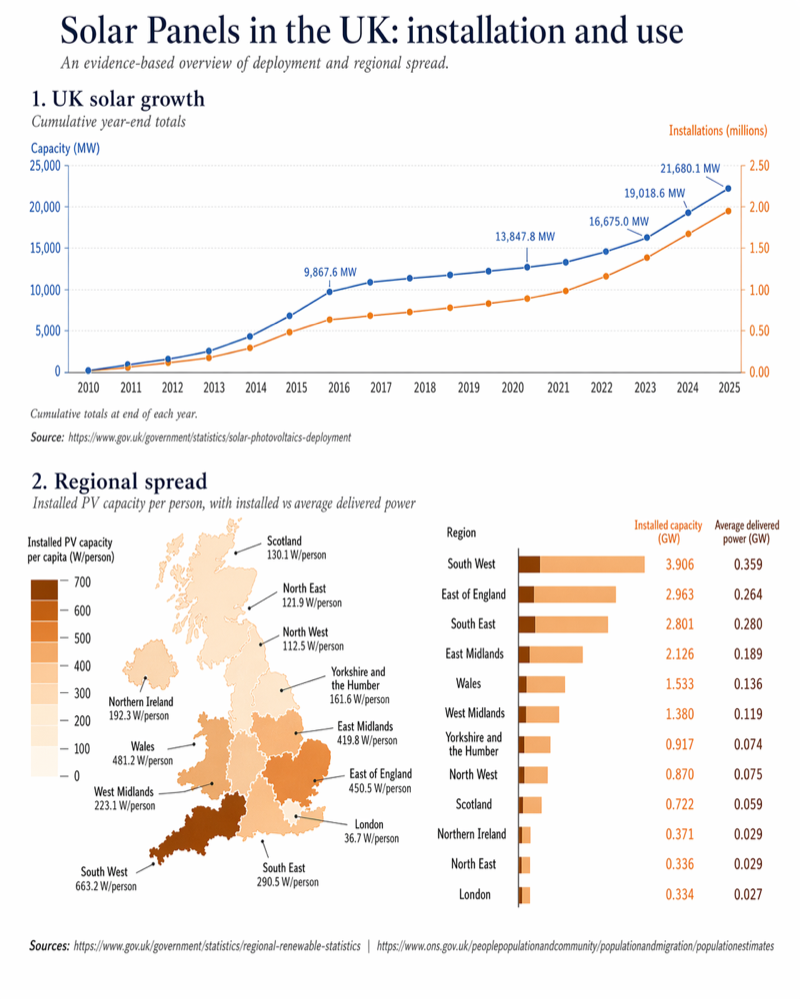
It looks good! It’s got sensible numbers, and looks nice.
However, let’s look more closely at the details.
The first graph looks fine:
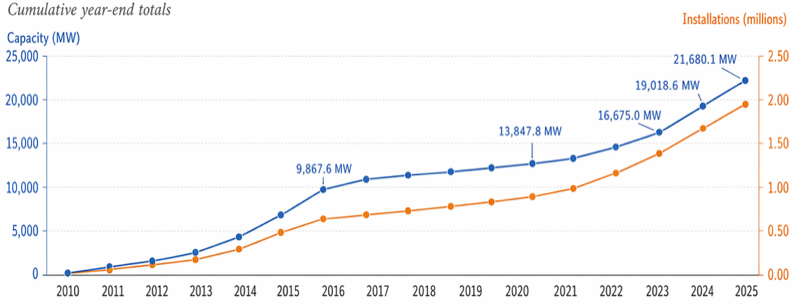
The position of the 21,6801 MW dot looks a little high, but measuring puts it at 258px when it should be 251px - wrong, but only 3% wrong, which doesn’t bother me.
But hold on… what’s happening with the x-axis? It goes from 2010 to 2025, and we’d expect 16 datapoints to go with that, one per year. But there are 17! Checking the original data, ChatGPT has invented an extra value (about 4900MW) in between 2013 and 2014, and has squidged up the datapoints so it’s not obvious. Why? I have no clue.
Also, compare the graph above to a previous iteration that ChatGPT drew in the same session:
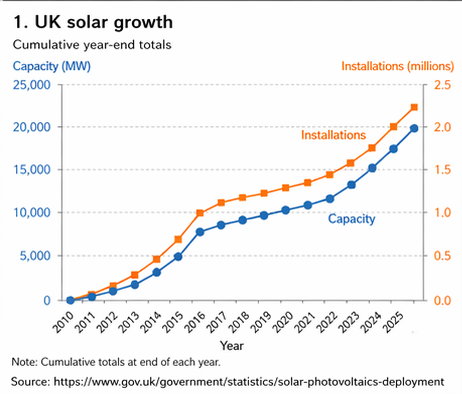
This also looks plausible, also references the same data set, but has swapped round the installations / capacity lines. They’re incorrect in this graph, correct in the previous one - but you wouldn’t know without checking the data.
How about the regional spread diagram? Again, looks good at first glance:
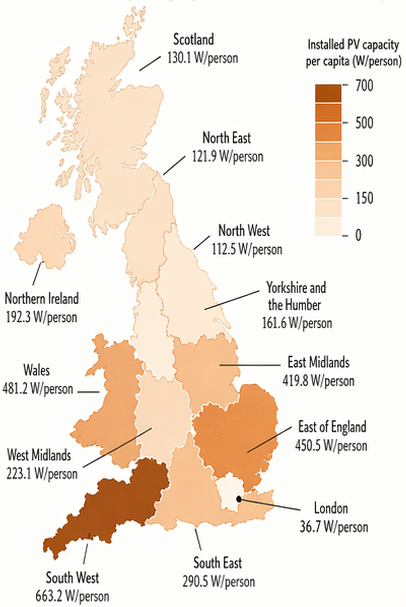
I’m not going to quibble that the West Midlands are going further south than usual, and London is a bit bigger - they’re still broadly right. But how has “North West” managed to be in the north east? And “North East” has taken over a big chunk of the west coast?
Finally:
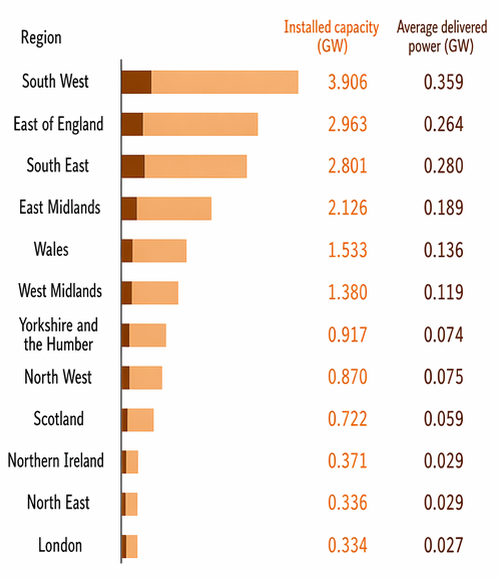
The numbers are correct - they’re taken from the government’s regional renewable statistics, and I’ve checked them against the published spreadsheets. But - the lengths of the bars don’t match up with the numbers they are displaying! The dark bars, giving delivered power, are all about twice as long as they should be. The first light bar is 177px long, representing 3.906 GW. The first dark bar, representing 0.359 GW, should be 16px at the same scale - but it’s actually 30px, almost twice as big. All the rest of the dark bars are similarly wrong - generally about double the length they should be. The light bars are much better, but still a few percent off. (If you add up the regions, the total installed capacity doesn’t match the total installed capacity that the other graph shows, but that’s a data issue, not a ChatGPT problem - the different sources use slightly different methodologies).
So, of the three graphs, all of them have problems - and the sort of subtle problems that you might not notice until you look closely. For some graphics, this isn’t important. But if you’re displaying the data graphically because the data matters, then this isn’t good enough.
Some of these problems can be fixed by repeated iterations of telling ChatGPT what to do better - but while it’s good at correcting textual problems and making large-scale changes, I’ve found it frustratingly bad at making small fixes to non-textual elements.
Conclusion
You can get nice looking infographics out of the new ChatGPT Images 2, but accuracy is harder. Using Thinking mode is important to allow it to search the web and run code, but even then ChatGPT can sometimes totally ignore the information it’s retrieved. And even if you do everything right, then ChatGPT can still make subtle and hard to spot mistakes.
At present, ChatGPT Images 2 is not a good tool for accurate infographics.